






4 Colors: Play the UNO-Style Card Game Free Online
In 4 Colors, a Wild Draw Three is worth 50 points to whoever wins the round, and you're only allowed to play it when nothing else in your hand fits. That rule, straight from the in-game tutorial, is the first sign this is more than a quick UNO clone. We played 4 Colors on October 8, 2026, a four-player game against the computer, and below are the rules, what every card is worth, the 1 button you must not forget, and how it compares with UNO.
- Developer
- Codethislab (in-game menu)
- On GamePix since
- December 20, 2021
- Modes
- Training (2, 3 or 4 players vs AI), Multiplayer online
- Win condition
- First to 250 points
- Special card
- Wild Draw Three, worth 50 points
- Penalty
- Forget the 1 button on your last card: draw 2
- Price
- Free
On this page
What Is 4 Colors?
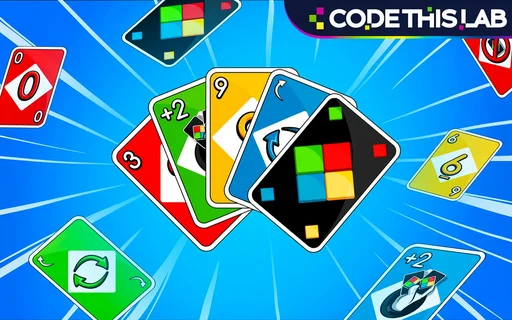
4 Colors is a free UNO-style card game by Codethislab. You match cards by colour or number, play action cards to skip, reverse or punish the next player, and try to empty your hand first. Training pits you against 1 to 3 computer players, and Multiplayer plays online.
It isn't UNO, and it doesn't use the name. CrazyGames, which lists the same Codethislab game, says Four Colors is "very much inspired by UNO", that it was first released in 2009, and that an October 2020 update added real-time multiplayer. This GamePix build is titled 4 Colors Multiplayer and went up on December 20, 2021.
Anyone who has played UNO will feel at home in a few seconds. The colours are red, yellow, green and blue, and the deck has +2, Skip and Reverse cards plus two black wild cards. The twist is the Wild Draw Three, which replaces UNO's Wild Draw Four and makes the next player pick up three. The game's other UNO habit is the 1 button: hit it when you're down to your last card, or pay for it.
Scoring makes every round count. The player who goes out scores the value of everyone else's cards, and the first to 250 points wins the game.
How to Play 4 Colors
You can play 4 Colors right here, no download. This is how our first game against the computer went.
- 1Choose Training
The menu has two buttons: MULTIPLAYER Play online and TRAINING Play against AI. Training asks for the number of players: 2, 3 or 4.
- 2Read the tutorial
Eight short cards explain the rules and card values. Use the arrow to page through them, or SKIP.
- 3Match the top card
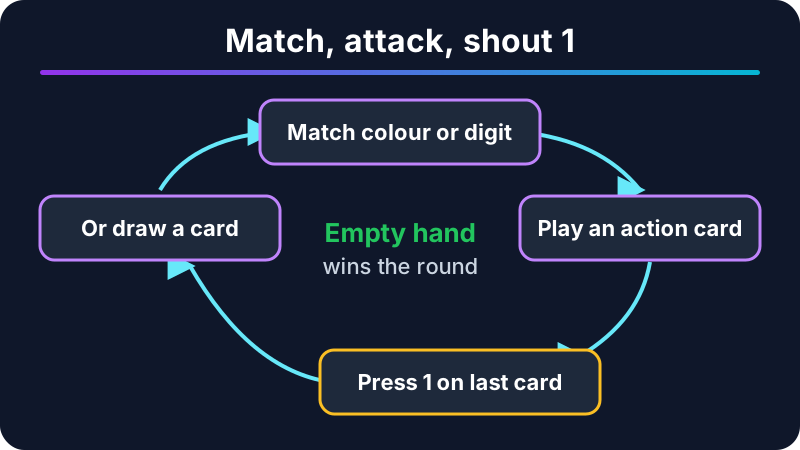
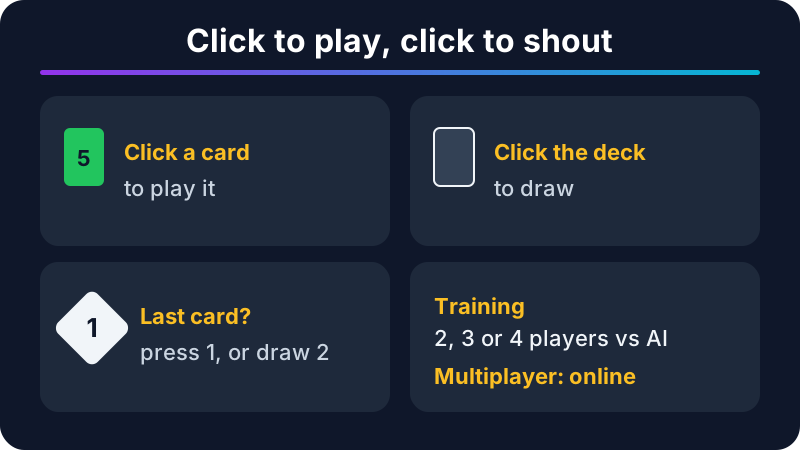
Click a card in your hand that matches the discard pile by colour or number. Our first discard was a yellow 9, so a yellow Reverse went straight on.
- 4Draw if you can't play
No match? Click the deck to draw a card.
- 5Use action cards
+2 makes the next player draw two and lose their turn, Skip stops the next player, and Reverse flips the direction, shown by the big arrows.
- 6Press 1 on your last card
When you play your second-to-last card, click the 1 button next to the deck. Forget, get caught, and you draw two penalty cards.
- 7Go out and score
Empty your hand to win the round and collect the value of everyone else's cards. First to 250 points wins.
4 Colors controls
Everything is a click or a tap: a card to play it, the deck to draw, the 1 button to call your last card. The menu (three lines, top right) holds Full Screen, Music and Sfx switches and a Main Menu button. GamePix marks the game mobile friendly in any orientation.
The tutorial has one line players tend to skip: "Remember to click it also for your opponents!" If a computer player forgets the 1 button, you can catch them out the same way.
4 Colors Card Values and Scoring
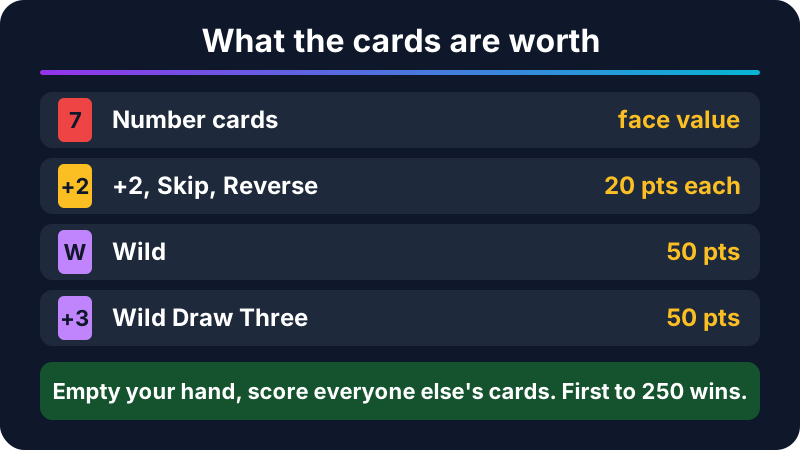
Card values matter because the winner of each round scores everything left in the other hands. Stuck with a Wild at the end of a round, you've just handed someone 50 points. Here's what the in-game tutorial lists for each card.
| Card | What it does | Points |
|---|---|---|
| Number card | Match by colour or number | The digit on the card |
| +2 (Draw Two) | Next player draws two and forfeits the turn | 20 |
| Skip | Stops the next player | 20 |
| Reverse | Switches the direction of play | 20 |
| Wild | Play on any card and choose the colour | 50 |
| Wild Draw Three | Choose the colour; next player draws three. Only when you have no other playable card | 50 |
- What it does
- Match by colour or number
- Points
- The digit on the card
- What it does
- Next player draws two and forfeits the turn
- Points
- 20
- What it does
- Stops the next player
- Points
- 20
- What it does
- Switches the direction of play
- Points
- 20
- What it does
- Play on any card and choose the colour
- Points
- 50
- What it does
- Choose the colour; next player draws three. Only when you have no other playable card
- Points
- 50
4 Colors card values, from the in-game tutorial (October 8, 2026)
The takeaway is simple: dump your 50-point wilds and 20-point action cards before a round can end, and keep low numbers for last. A hand of a 1 and a 2 costs you three points if someone else goes out; a Wild costs fifty.
4 Colors Tips (From Our First Game)
Stack +2 cards
When the computer hit us with a yellow +2, we answered with our green +2, and the game accepted it: the pile turned green and the next player picked up the cards instead of us. Keep a +2 in reserve for exactly that moment.
Watch the arrows
Two big arrows around the pile show the direction of play. In our game, a yellow Reverse from us and a green Reverse from the computer flipped them twice in a row, which brought the turn straight back to us.
Count the other hands
Each opponent's cards fan out face down at the table edge, so you can see who is close to going out. When someone drops to two cards, hold your +2 or Skip for them.
Click 1 the moment you play your second-to-last card
Don't wait for the next turn. The penalty is two cards, and on a full table that can turn a winning hand into a losing one.
Save the Wild Draw Three for when you're stuck
The rules only let you play it when no other card in your hand fits. Treat it as an escape card, and remember it's 50 points against you if the round ends first.
4 Colors vs UNO
Most people searching for UNO online want the real thing, and CrazyGames even files this game at an address ending in uno-online. So here's how far apart the two are. The UNO column uses CrazyGames' description of the classic card game; the 4 Colors column is from our game and the in-game tutorial.
| 4 Colors (this page) | UNO | |
|---|---|---|
| Made by | Codethislab | Merle Robbins, 1971; now owned by Mattel |
| Colours | Red, yellow, green, blue | Red, yellow, green, blue |
| Action cards | +2, Skip, Reverse | Draw Two, Skip, Reverse |
| Big wild | Wild Draw Three | Wild Draw Four |
| Last-card call | Press the 1 button | Say "UNO" |
| Deck | Not stated in the game | 108 cards |
| Scoring | Round winner scores the other hands; 250 wins | Not covered by our source |
- 4 Colors (this page)
- Codethislab
- UNO
- Merle Robbins, 1971; now owned by Mattel
- 4 Colors (this page)
- Red, yellow, green, blue
- UNO
- Red, yellow, green, blue
- 4 Colors (this page)
- +2, Skip, Reverse
- UNO
- Draw Two, Skip, Reverse
- 4 Colors (this page)
- Wild Draw Three
- UNO
- Wild Draw Four
- 4 Colors (this page)
- Press the 1 button
- UNO
- Say "UNO"
- 4 Colors (this page)
- Not stated in the game
- UNO
- 108 cards
- 4 Colors (this page)
- Round winner scores the other hands; 250 wins
- UNO
- Not covered by our source
4 Colors vs classic UNO (as of October 8, 2026)
If you know UNO, you already know 4 Colors. The real differences are a draw-three wild instead of a draw-four, a button instead of shouting, and a points race to 250 that makes each round count.
Is 4 Colors Worth Playing?
Yes, if you want UNO-style rounds in a browser tab without an app or an account. It's quick, clear and faithful to the formula.
What we liked
- Familiar rules, explained in an eight-card tutorial you can skip.
- Up to three computer opponents, and stacking +2s works.
- Point scoring that makes every round matter.
- Clean cards and big direction arrows that are easy to read.
What held it back
- It's not official UNO, so no Mattel rules, decks or events.
- The computer players move fast, and the table can feel rushed.
- We couldn't vouch for the online mode in our session.
- Only two menu modes; no house-rule settings.
Best for a quick card game against the computer when you don't have a deck or a group handy, or for anyone who wants something close to UNO online without installing an app.
Can You Play 4 Colors at School?
It depends on your network. 4 Colors is a light browser game, so a Chromebook runs it when both steal-brainrot.co and GamePix's servers get through the filter. We can't promise it's unblocked anywhere, and this page isn't a proxy. Our unblocked games page has more picks with the same caveat.
Games Like 4 Colors
More quick thinking games on the site:
- Master Chess: another Codethislab game, with four AI levels and 5,000 puzzles.
- Bloxorz: the 2007 block-rolling puzzle, with all 33 level codes.
- 2048: slide and merge numbered tiles until you reach 2048.
- Basketball Stars: quick head-to-head matches for one or two players.
For more picks, see our popular games.
Controls
Desktop
Mobile
4 Colors Multiplayer FAQ
Is 4 Colors the same as UNO?
Is 4 Colors free?
How many players can play 4 Colors?
How do you win 4 Colors?
What happens if you forget to press 1?
Can you stack +2 cards in 4 Colors?
Can you play 4 Colors on a phone?
How we tested this game
We played the GamePix build in Chrome on a machine without a graphics card: the menu, the eight-card tutorial and a four-player Training round against the computer, including stacking a +2 and calling the 1 button. We didn't test online Multiplayer.
We don't show star ratings or play counts on game pages unless we can check them. Spotted something that changed? Tell us.
Comments (0)
Loading comments...