






Play Mine-Online Online Free - Sandbox Game

Mine-Online

4.2
Play Speed Escape for Brainrots Online Free - Brainrot Game
Play Run for Brainrots Online Free - Brainrot Game
Play Cross Bridge for Brainrot Online Free - Brainrot Game
Play Grow Beanstalk for Brainrots Online Free - Brainrot Game
Play Helicopter vs Brainrots Online Free - Brainrot Game
Play Obby Brainrot: Glass Bridge Online Free - Brainrot Game
Play Obby: Rob the Brainrot Base Online Free - Brainrot Game
Play Obby World: Squid Escape Online Free - Action Game
Play Steal & Create Brainrot: Short Circuit Online Free - Brainrot Game
Play Mr Flips Online Free - Casual Game
Play Xlope Online Free - Arcade Game
Play Slope Rider Online Free - Arcade Game
Play Space Waves Online Free - Arcade Game
Play Rob a Car Online Free - Action Game
Play Escape Animals Online Free - Action Game
Play Wacky Steps Online Free - Casual Game

Mine-Online

Rating:4.2 (5.1M+ played)
Classification:
SandboxMultiplayer

Minecraft costs $30 and requires a Microsoft account and a Java installation. Mine-Online costs nothing and requires a browser tab. For a lot of people, that is the entire pitch, and honestly, it is a good one.

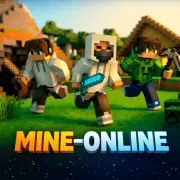
Mine-Online is a browser-based sandbox that recreates the core Minecraft experience — mining blocks, crafting tools, building structures, and surviving in a procedurally generated voxel world. It is not official Minecraft. It does not have every feature, every mob, or every crafting recipe. But it has the things that matter: the satisfying crunch of breaking stone, the creative freedom of placing blocks wherever you want, and the quiet thrill of exploring a world that generates infinitely in every direction.

The game is surprisingly capable for something running in a browser. You get multiple biomes, a day-night cycle, crafting systems, basic survival mechanics, and the ability to build anything your imagination (and your patience) allows. Is it a perfect 1:1 Minecraft clone? No. But it is free, it is instant, and it scratches the same itch.

How to Play Mine-Online

WASD moves you around the world. Mouse controls where you look. Left-click mines (breaks) the block you are targeting. Right-click places a block from your inventory. Space to jump. Shift to crouch (prevents you from walking off edges — vital when building at heights). That is the Minecraft control scheme, and Mine-Online mirrors it exactly.

Start by punching a tree. Seriously. Your first action in any new world should be breaking wood blocks with your bare hands. Wood is the foundation of early crafting — turn logs into planks, planks into sticks, and sticks plus planks into basic tools. A wooden pickaxe lets you mine stone. Stone tools mine iron. Iron tools mine everything else. The progression from wood to stone to iron to diamond is the spine of the game.

Once you have basic tools, you need shelter. The day-night cycle means hostile mobs (or at least dangerous darkness) comes when the sun sets. Build four walls, a roof, and a door before nightfall on your first day. It does not need to be pretty. It needs to exist. Aesthetics come later when you are not being attacked.

From there, the game opens up. Dig deep underground for rare ores and materials. Explore the surface for new biomes and interesting terrain. Build a house, then a tower, then a castle, then a full city. The crafting system lets you create increasingly sophisticated tools, weapons, and building materials. How far you take it is entirely up to you.

Strategies & Tips

First-Day Survival Checklist

(1) Punch trees for 20-30 wood blocks. (2) Craft a crafting table from planks. (3) Craft wooden tools — pickaxe first, then axe, then sword. (4) Mine 20+ cobblestone and upgrade to stone tools immediately. (5) Build a basic shelter before dark — four walls and a roof, nothing fancy. (6) Craft torches (coal + sticks) to light your shelter. If you accomplish all six of these in your first day cycle, you are ahead of most new players.

Resource Priority

Wood is infinite and everywhere — do not hoard it. Stone is your real early-game currency. Iron is the mid-game goal — once you have iron tools, you can mine anything efficiently. Do not waste iron on swords or armor until you have a full set of iron tools (pickaxe, axe, shovel).

Building Tips

Build on flat ground or at the top of a hill for visibility. Dig a mine entrance inside or next to your base so you can access underground resources without traveling. Light everything — torches prevent mob spawns and help you find your way back. Build your structures at least 3 blocks tall inside so you have comfortable headroom.

Underground Exploration

The best ores spawn at lower depths. Dig a staircase mine (digging downward at a 45-degree angle) to reach the lower levels efficiently. Branch mining at low depths (digging long straight tunnels with branches every 3 blocks) is the most efficient way to find rare materials. Always carry torches and extra food when going underground — getting lost in the dark with no food is a bad time.

Controls

🖥️ Desktop

WASDMove
MouseLook around
Left ClickMine / Attack
Right ClickPlace block
SpaceJump
ShiftCrouch / Sneak
EInventory
1-9Select hotbar slot

📱 Mobile

JoystickMove
TapMine / Place
SwipeLook around
Jump BtnJump

Frequently Asked Questions

mine onlineminecraft online freeminecraft unblockedbuilding gameminecraftsandboxmultiplayerfree

Comments (0)

Sort by:

Loading comments...

More Games

Explore our full collection of free online games.